


A QR code—just scan it, right?
QR codes have, so to speak, become part of our culture. Everyone knows them, but have you actually used them yet? Have you ever thought about their potential? Maybe QR codes can open new doors for your business. Let’s dive right in. We’ll start with a quick example:

Scan the QR code
A QR code (Quick Response Code) is a scannable barcode that takes a user directly to a web page or prompts them to perform a specific action.
To put it simply: QR codes are a tool that marketers can use to bridge the gap between the physical and digital worlds.
This scanning software works more or less the same way as barcode software, but the main difference is that QR codes can store much more data. Barcodes represent a sequence of letters, numbers, and symbols, but a QR code can carry as much as 406 bytes of data. That might not seem like a lot, but it’s enough to open a website or video on your smartphone.
Here are a few examples of situations where you can use a QR code:
- Contact information: like a virtual business card that automatically saves itself to your smartphone.
- Call: Scan the code and give them a call.
- Scan location: When you scan the QR code, it sends your location to the appropriate organization or app.
- Add events: Scan the code to automatically add all event details to your calendar.
- Wi-Fi network: When you scan the code, you automatically gain access to a network. The code identifies the correct network and immediately enters the correct password.
- Websites: When scanned, the user is immediately taken to the correct website.
- …
In Asia, the Chinese social media app Weibo is widely used to make personal purchases by scanning QR codes. User profiles are linked to a digital wallet. Scanning the code for their meal automatically deducts the price from their account. The West isn’t quite on board yet, mainly because many people aren’t comfortable linking their bank accounts to their social media accounts.
However, Amazon is trying to change that with Amazon Go. Learn more about it here.
How do you actually scan a QR code?
These days, it’s pretty simple. Just by taking a photo of a QR code, your camera will often recognize it. Is your smartphone not capable of doing this yet? Don’t worry—there are plenty of apps that can read QR codes!
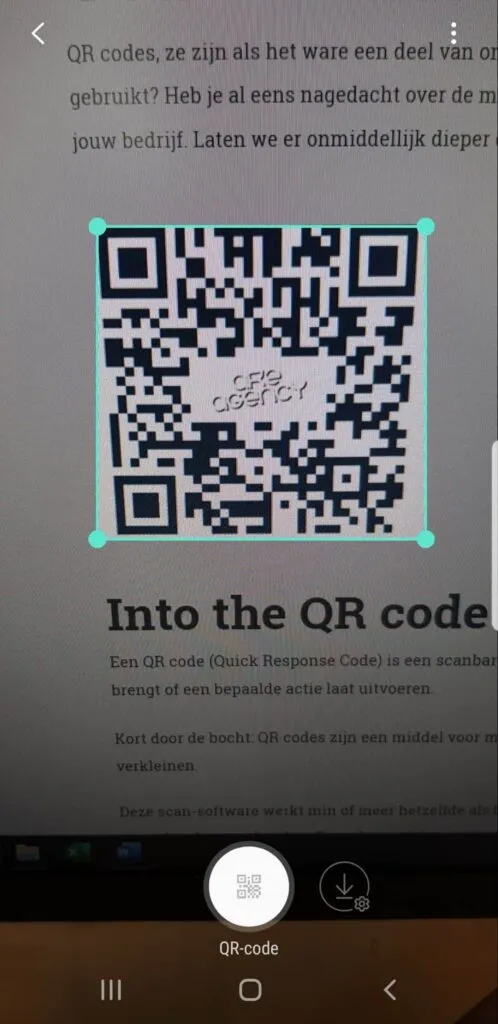
My camera recognizes a QR code in the image (Samsung Galaxy—via Bixby Vision)
Create Your Own QR Code
Creating a QR code
is just as easy as scanning one. There are several websites that can help you do this for free. You can customize the QR codes to your liking (color, shape, image, etc.). The QR code in this blog post was created using QRCode Monkey.
Need more info or help? Then scan the QR code in this blog!